1. Home
  2. »
  3. Heat Pump
  4. »
  5. Federal 25C Tax Credit: How to Claim (2025)

Federal 25C Tax Credit:
How to Claim For 2025

This page walks through how to claim the federal heat pump tax credit for 2025, including the new QMID requirement, what documents you need, and exactly where everything goes on Form 5695 for heat pumps and heat pump water heater installations.

AI Summary
The federal 25C tax credit lets you claim 30% of heat pump installation costs, up to $2,000. For 2025, you need a QMID from your manufacturer to file Form 5695. Keep your invoice and documents to claim this non-refundable credit that reduces your taxes dollar-for-dollar.
BlueAI can make mistakes. Check important info.

What’s new for 2025: you need a QMID

For heat pumps installed in 2025, the IRS requires a Qualified Manufacturer Identification Number (QMID) to be reported on Form 5695 for the federal energy efficient home improvement credit.

QMID Line 29A 5695
QMID is required for 2025

How UniColorado customers get their QMID

Eligible UniColorado customers will receive an email that includes their invoice, AHRI certificate, and QMID. The QMID provided can be used directly when filing taxes.

If you didn’t buy from UniColorado

You still need a QMID to claim the credit. UniColorado has created a free public QMID directory available at:
Rebate Blue QMID Directory

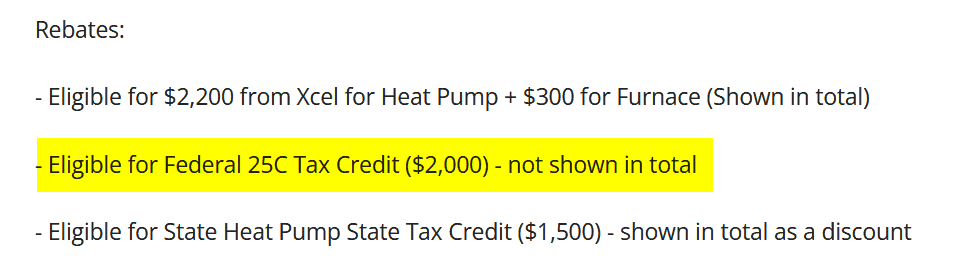
Eligibility Criteria for the 25C Federal Tax Credit for Heat Pumps:

  • Heat Pumps and Heat Pump Water Heaters: If your estimate or invoice includes “Eligible for Federal 25C Tax credit,” you can claim a credit of 30% of the invoiced amount, up to a maximum of $2,000.
  • Electrical Panel Upgrades: If you upgraded your electrical panel as part of an eligible heat pump project, you can claim 30% of the invoiced amount, up to a maximum of $600.
  • Got a heat pump tax credit email from us
25c tax credit
If this line is present in your estimate/invoice, your system is eligible.

Important highlights of the federal 25C tax credit

  • You can claim 30% of eligible costs:
  • Up to $2,000 for heat pumps and heat pump water heaters.
  • Up to $1,200 for other improvements, including up to $600 for qualifying electrical panel or circuit upgrades related to a heat pump.
  • Installations must be completed in the tax year you are claiming. The credit resets each year.
  • The equipment must be installed in an existing primary residence in the United States. New construction and rental properties do not qualify.

Example:
If your federal tax liability is $4,000 and you qualify for a $2,000 credit, your tax owed is reduced to $2,000.

Disclaimer: Please consult a tax professional for advice on your individual tax situation. We are not responsible for any specific tax issues that may arise from our simplified guide.
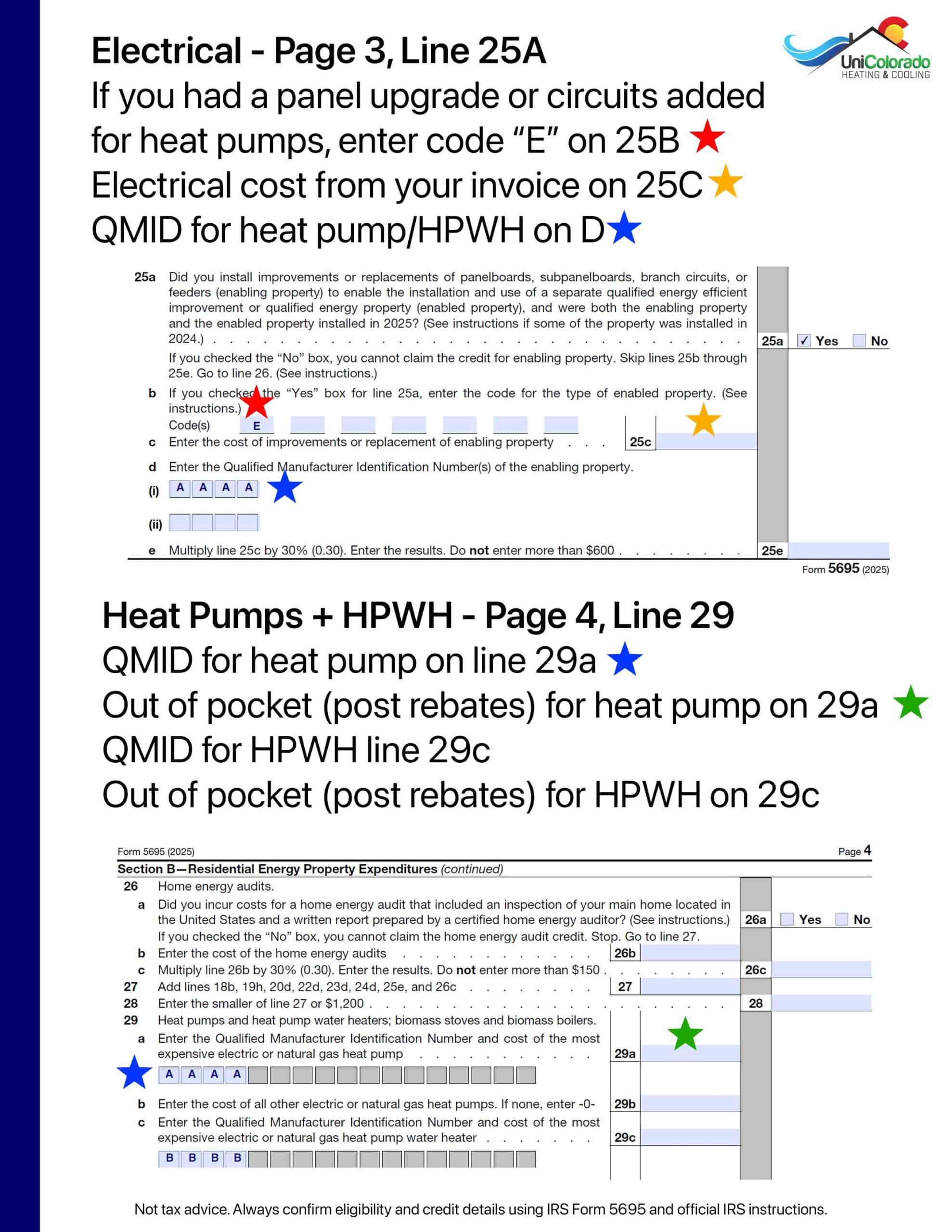
Form 5695 Instructions for heat pumps

Documents you need

  • Your completed heat pump installation invoice
    (Click here to request if you don’t have it)
  • Total cost of installation (including labor)
  • Address where the heat pump was installed (must be a primary residence)
  • Basic tax information (SSN, etc.)
  • Verification that the unit meets criteria (we verify this before installation and email you a certificate)

Step-by-Step Instructions

Step 1: Basic Information

  • Enter your name and Social Security Number at the top of Form 5695
  • Fill in the complete address where your heat pump was installed

Step 2: Skip Part I

    • Unless you’ve also installed solar panels or other renewable energy systems, you can skip Part I (lines 1-16)
Form 5695 easy flyer for heat pump tax credit 2025
Where you need to focus for your heat pump tax credit

Step 3: Part II, Section B — Electrical + Heat Pumps (2025)

Electrical (Page 3, line 25) — only if you did a panel upgrade or added circuits specifically to enable the heat pump or heat pump water heater.

  • Line 25a
    Check “Yes” if the electrical work (panel, subpanel, branch circuits, feeders) was needed to install and use a qualifying heat pump/HPWH, and the enabling work and the enabled equipment are treated as installed in 2025.
  • Line 25b
    Enter the enabled property code:
    E = heat pump
    F = heat pump water heater
  • Line 25c
    Enter the electrical upgrade cost from your invoice. This is the portion for the enabling work (panel/circuits/wiring) and related labor.
  • Line 25d
    Enter the QMID(s) for the enabled equipment (heat pump and/or heat pump water heater). If you installed both, list both QMIDs.
  • Line 25e
    30% of line 25c, up to a maximum of $600.

Heat pumps + heat pump water heaters (Page 4, line 29)

  • Line 29a
    Enter the QMID and your out-of-pocket cost for the most expensive electric or natural gas heat pump.
  • Line 29b
    Enter the out-of-pocket cost for any additional electric or natural gas heat pumps. If none, enter -0-.
  • Line 29c
    Enter the QMID and your out-of-pocket cost for the most expensive heat pump water heater (if applicable).
  • Line 29d
    Enter the out-of-pocket cost for any additional heat pump water heaters. If none, enter -0-.
  • Line 29g
    Add lines 29a through 29f.
  • Line 29h
    Multiply line 29g by 30% (0.30). Maximum allowed is $2,000.

Important notes

  • The credit is limited to $2,000 for heat pumps and heat pump water heaters combined.
  • This is a tax credit, not a deduction. It reduces your federal tax liability dollar-for-dollar.
  • Keep all invoices, QMIDs, AHRI certificates, and supporting documents with your tax records.

Filing instructions

  • Include the completed Form 5695 with your federal tax return.
  • Transfer the final credit amount from line 32 to Schedule 3 (Form 1040), line 5b.
  • File everything together with your complete tax return.

Additional information

  • This is a non-refundable credit and can only reduce your tax liability to zero.
  • The credit applies to qualifying heat pumps placed in service during the 2025 tax year.

Not tax advice. Always confirm eligibility and credit details using IRS Form 5695 and official IRS instructions.

Request Information (UniColorado Customers)
Tax Credit Form

Sorry, this service is only available for our customers. Contact your installer.

For security reasons, tax-related documents can only be sent to the contact information we have on file. We aim to process requests within one business day. Please note that this service is exclusive to UniColorado customers.

Claim Your Coupon 🥳
Loading...
Enter your info below and we'll send you the link to redeem.
Coupon Code
By submitting the form you agree to our